
Service
Deduct the deposit from the final billing.
Book deposit returns directly in the billing sheet — for example, when a guest returns bottles, glasses or crates.
Deposit is added to the order if a deposit item is associated with the product—the POS app then calculates it automatically. If a customer returns bottles, glasses, or crates at checkout, you record the return directly on the settlement sheet, without having to go through the menu.
Deduct deposit
Schritt 1 von 1
Step 1
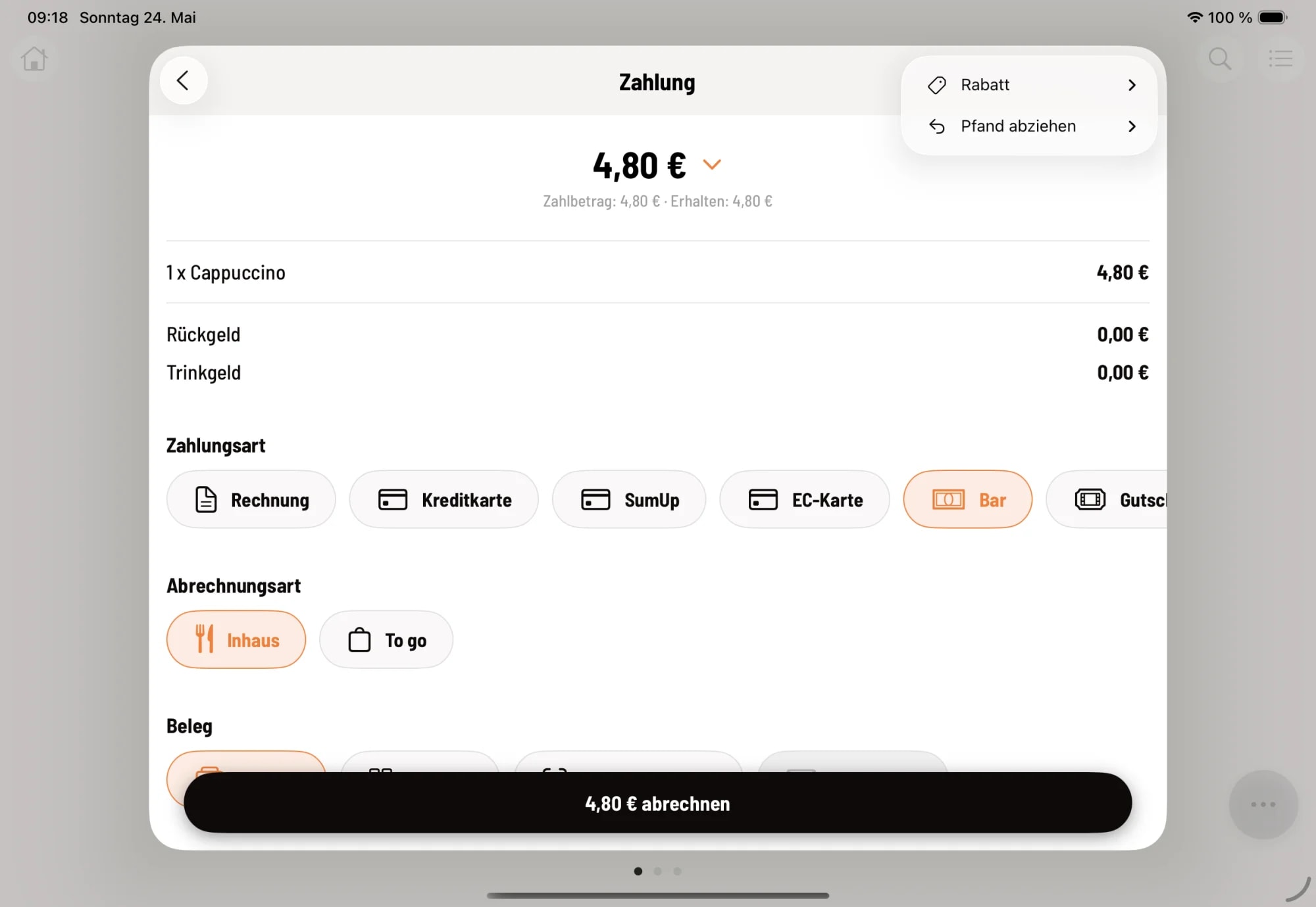
In the summary screen, tap the three-dot menu in the top right corner and select "Deduct deposit".
The submenu contains the deposit items created in the web portal (e.g., bottle deposit, cup deposit, crate deposit). For each deposit item, select a quantity from 1 to 6. The value is always deducted from the receipt total—there is no option to add items in this menu.
The deposit refund appears as a separate line item with a leading minus sign. This clearly shows guests the amount they have been refunded.
The deposit refund is capped at the merchandise value. If the selected amount exceeds this, the message "Deposit refund exceeds merchandise value" will appear. Deposits are only added to the receipt total for ordered items that include a deposit.