
tip at the end of the cash register
Whether tip stay in the till or are paid out at the end of the shift, and where you can see the amount.
The owner determines what happens to the tip at the end of the tip in the Web desk under ** tip at the end of the shift**: Set tip payout.
** tip stay in the till**: Nobody takes anything. In the shift overview, under Your tip it says "Stays in the till".
**Employees pay themselves cash tip **: Cash tip are taken from the till. Card tip are paid separately, for example with wages.
**Employees pay themselves all tip **: Even card tip are paid out in cash from the till.
When a cashier makes a payment, the cash register records "tip payment (Name)" in the cash book. The target amount during the cash count is therefore already reduced.
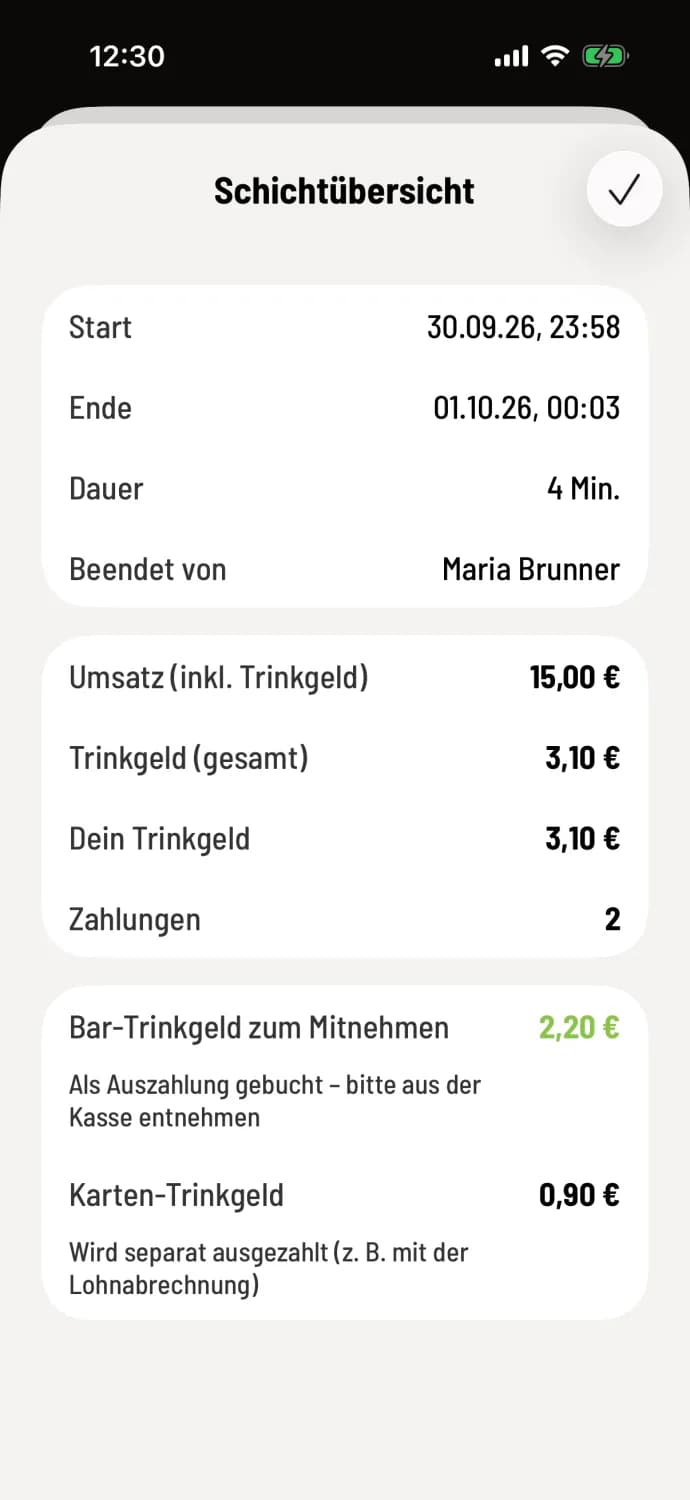
The shift overview shows what you take with you: Cash tip to take away or ** tip to take away**. If there's no service till, it shows the ** tip withdrawal (total shift )**, which you distribute among everyone. If a colleague has collected the money for you, Pass on to… and Received from… show who tip whom.
With the service till, the following also applies: If you count more than the target amount, the till will ask for a positive difference. In both payout options, you can add the excess **as a cash tip **, otherwise it will only be displayed as a difference.
If the cash register doesn't have enough cash for payment, the system will warn you that ** tip exceed cash balance**. If the money is indeed in the register, record the missing amount as income in the cash register and end the shift again, or pay out using Pay out anyway.
The setting can only be changed when no shift is running.