
Service indicator: Waiting time at the table
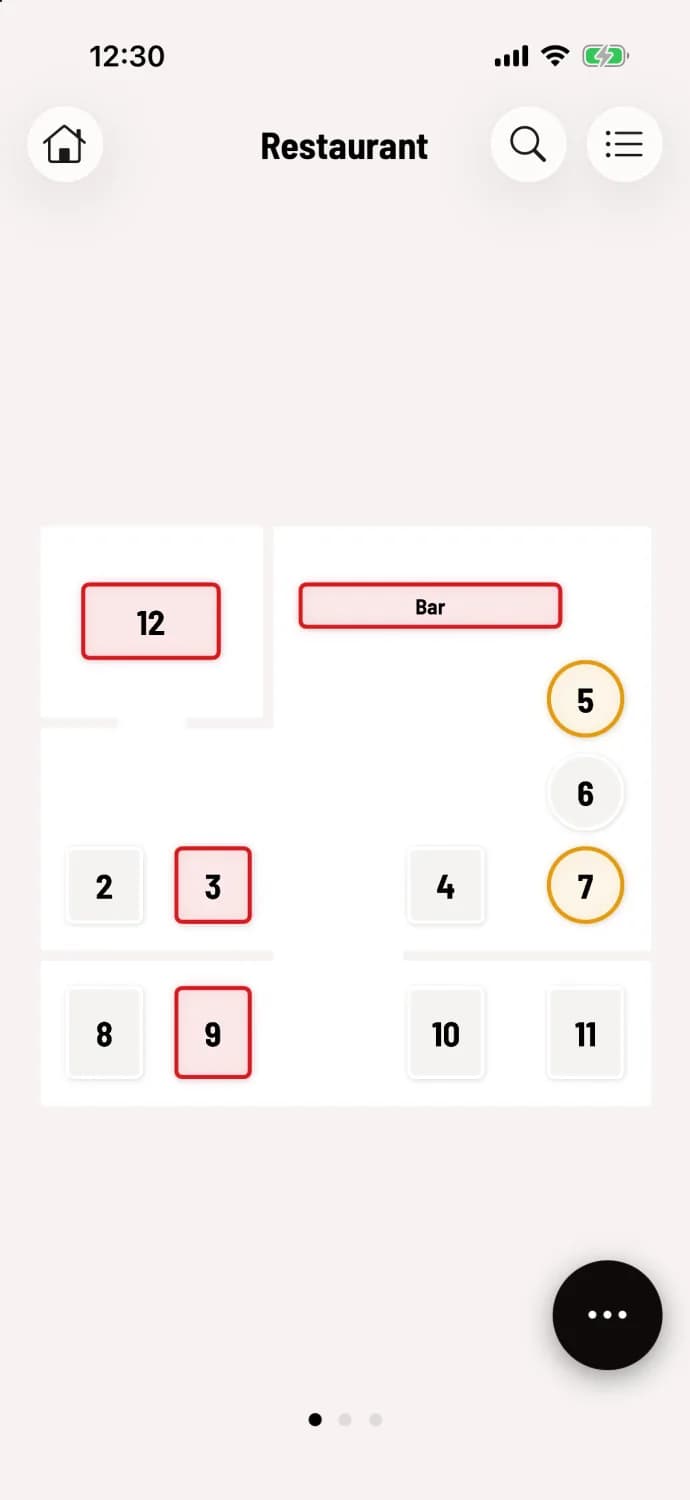
Green, yellow, red – that's how the table plan shows where no one has ordered for a while.
The service indicator colors the border of each occupied table according to the time elapsed since the last order at that table. This way, you can see at a glance where you should inquire.
This is how the traffic light works
After submitting an order, the table turns green.
After 15 minutes without a new order, it turns yellow.
After 30 minutes he turns red.
Each reorder resets the traffic light to green.
The table is free again after the bill has been paid.
All devices display the same colors, regardless of who is serving the table. The same time is shown in the table search and the order list.
Change minutes or turn off traffic lights
In the Web desk , you can define how many minutes it takes for a table to turn yellow and then red, or completely disable displaying service time notifications in the POS app: Set number of people and service time notifications. Without the traffic light system, occupied tables have an orange border, and the kitchen clock on the tile is removed.
Shorter snack bar , longer ones for restaurants with a sequential menu. Users in the statistics beta program also receive additional tips that learn from their usual meal times: pace indicators in the table plan.