
shift cannot be ended
What each message means and how you can still close the shift .
Before the end of your shift, the cash register performs a few checks. Fix the problem and tap **End shift ** again.
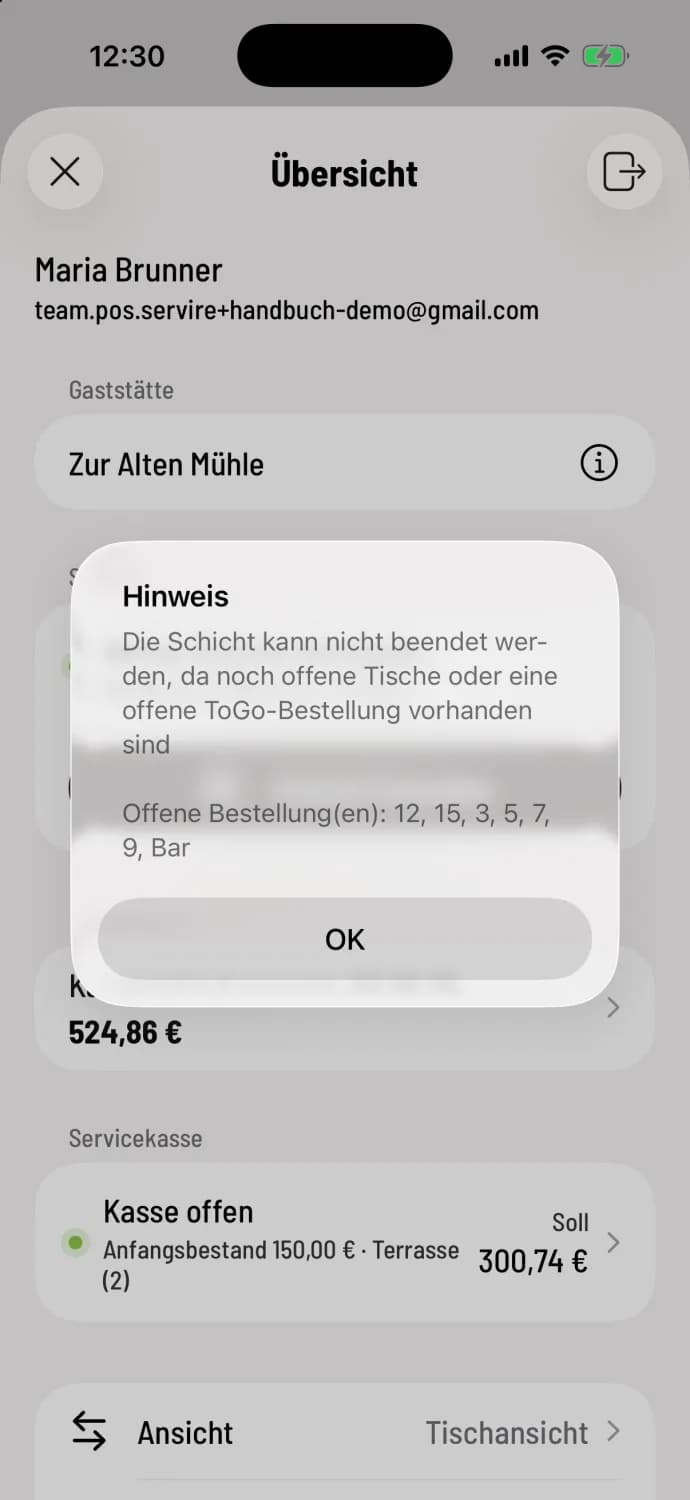
Settle open orders
The message (iPhone/iPad: Notification, Android: Open Items) states, "The shift cannot be ended because there are still open tables or an open takeaway order," and lists all tables and takeaway orders under "Open Order(s)," such as 12, 15, 3, 5, 7, 9, Bar, that have not yet been settled. Settle them, send a message ( Send a Message ), or cancel them.
More news
An internet connection is required for this action: The end of the shift needs internet.
Cash register active on another device: In the Servire Free and Servire Solo plans, only the device currently running the cash shift will end the shift. End it there or take over the cash register on this device using Take over cash register here.
Open Time Entries: Colleagues are still clocked in. Close Anyway will clock you out; the others will clock out themselves, otherwise Servire will automatically close their entries later and mark them for review.
Ongoing Card Refunds: As long as the payment provider has not yet confirmed a refund, the shift cannot end. If Yes is selected, the cash register will check with the provider. If the outcome of a refund is unclear, the cash register will simply advise: Check it in the provider's portal.
Open service checkouts: not blocked. Enter now counts your own checkout, End anyway closes the others uncounted.
Empty shift (Android: Discard shift ?): Without any accounting, the shift is deleted after confirmation, without a Z-report.
The table in question cannot be found.
If the table area has been deleted, the only remaining option is to use the table plan. Open the order list in the upper right corner. Under Orders for this shift, tap the order; the billing will open directly: Show order list.
The automatic shift end function closes the shift even with open tables. These tables then appear in the order list under Transfer and can be settled in the next shift .