
Choosing the right reasons for cancellation
Which reason is appropriate for which situation and when it is mandatory.
Every cancellation has a reason. This way, you can see later why it was cancelled. New restaurants start with five default reasons. In a party's menu, there's a short explanation under each reason; in the Select Cancellation Reason window, only the name is displayed for a single row.
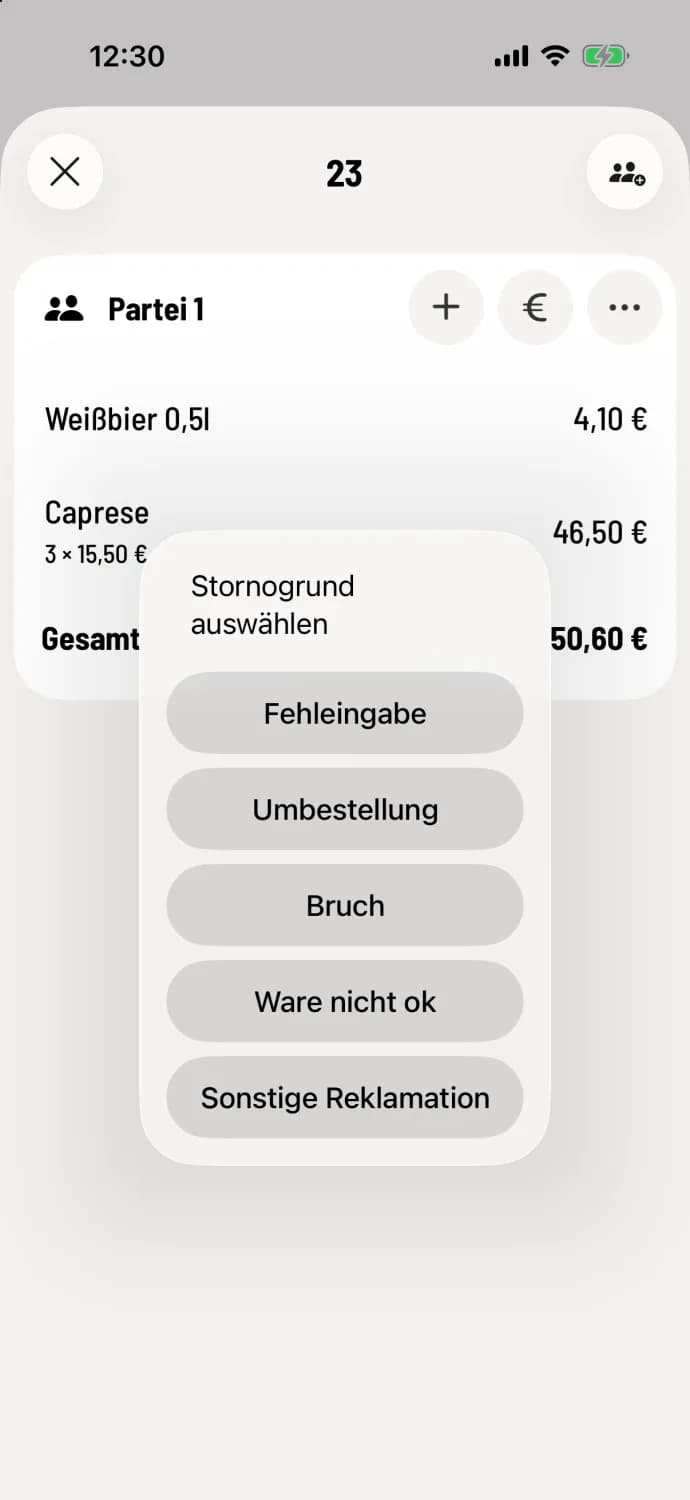
Incorrect entry – booked by mistake, for example a typo.
Order change – the guest requests something different.
Break – broken or spilled.
Product not OK – the quality is not up to standard.
Other complaint – another reason from the guest.
When a reason is a duty
Billed receipt and free amount – the button remains locked for no reason. If neither applies, select Other and write your own text.
Before settling the bill – at the table and for takeaway orders, you select from the list. If no reason is selected, the entry is labeled Cancel without reason.
The owner manages the reasons for cancellations in the Web desk: Manage cancellation reasons. Custom reasons appear without explanation; their name must be self-explanatory. In the Web desk, Statistics → Control displays cancellations by reason, person, and time. Under Individual, each cancellation is shown with item, time, and reason: Evaluate statistics.
Choose the reason that actually applies. A typo is Input Error, not Other Complaint. The analysis will then show where the problem lies.