
Guest orders at the cash register
How your guests' orders arrive at the cash register and what is different about orders paid online.
Guest orders are automatically sent to the POS app and printed without any action on your part. This applies equally to iPhone, iPad, and Android.
Prerequisite: You set up guest orders in the Web desk : Setting up guest orders. Printing is done by the print center or a cash register with Print online orders ( Print online orders at the cash register ).
Where the orders appear
At the table – an order placed via QR code appears at this table like any other order, with the same positions, vouchers, and colors on the table plan. There is no separate marker.
For pickup – this order doesn't have a table. You can find it in the order list, and the pickup number is also available in the pickup numbers section ( view order list ). Tapping this option will open the payment page directly.
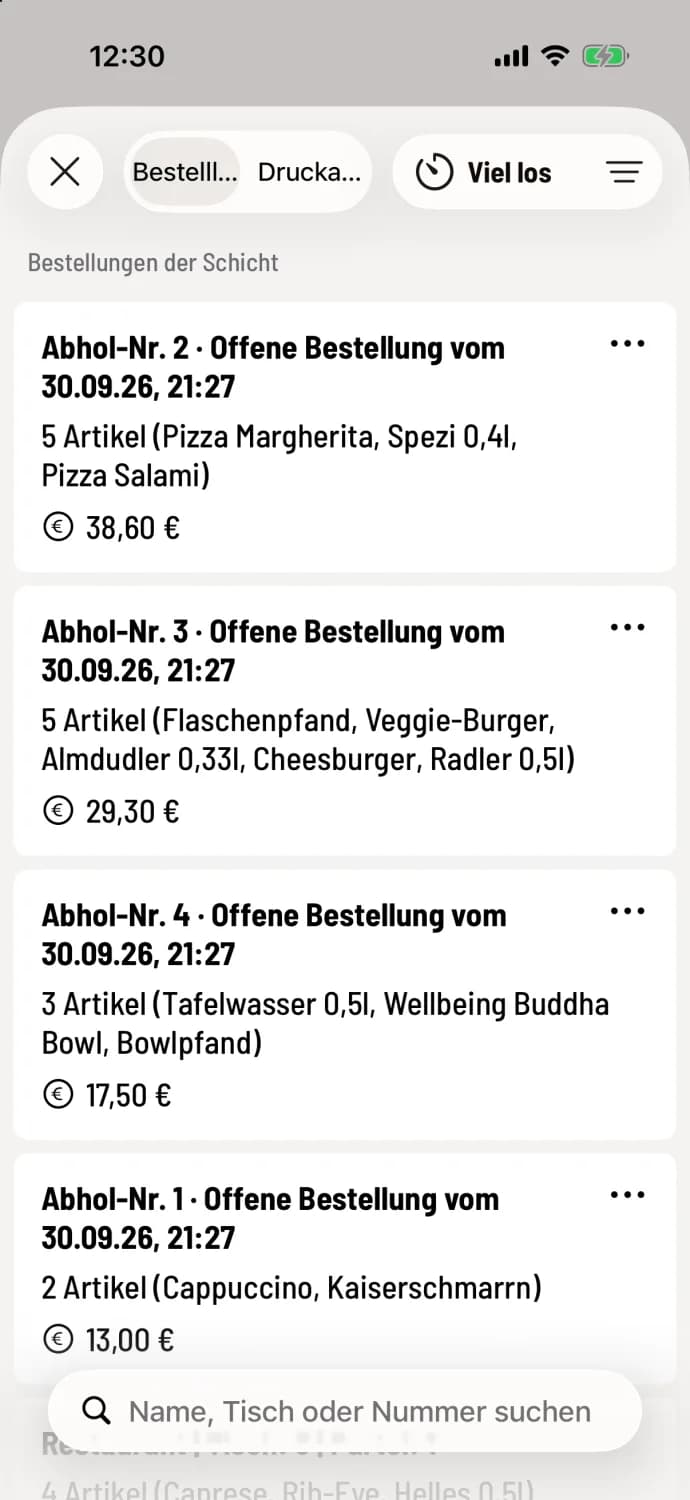
Pickup from the order list
Under ** shift Orders**, pickup orders are listed as Pickup No. … with items and amount, but without a table. The search function below can find them by name, table, or number. The Busy button appears at the top if it is enabled in the Web desk .
Paid online: what's different
Non-changeable – you cannot change an online paid guest order at checkout, nor can you cancel individual items.
Do not contact – the Contact tile is blocked, the order has already been paid for.
Complete cancellation only – when canceling, all items are selected, and the checkout displays Guest order – will be fully refunded to the guest. The money is returned via the payment provider. See Canceling already processed orders.
Payment upon collection
If the guest has selected "Pay on site upon pickup," you will process the order as usual upon pickup. Any tip selected by the guest during the ordering process is pre-filled and marked requested by guest. You can change or delete it.