
Understanding table tiles: color, symbol, and amount
What frames, symbols, and amounts mean on a table in a table plan .
Each table tile shows you the status of the table without you having to tap: The frame indicates how long it has been since an order was placed, the amount shows what is outstanding, and a symbol shows what needs to be done next.
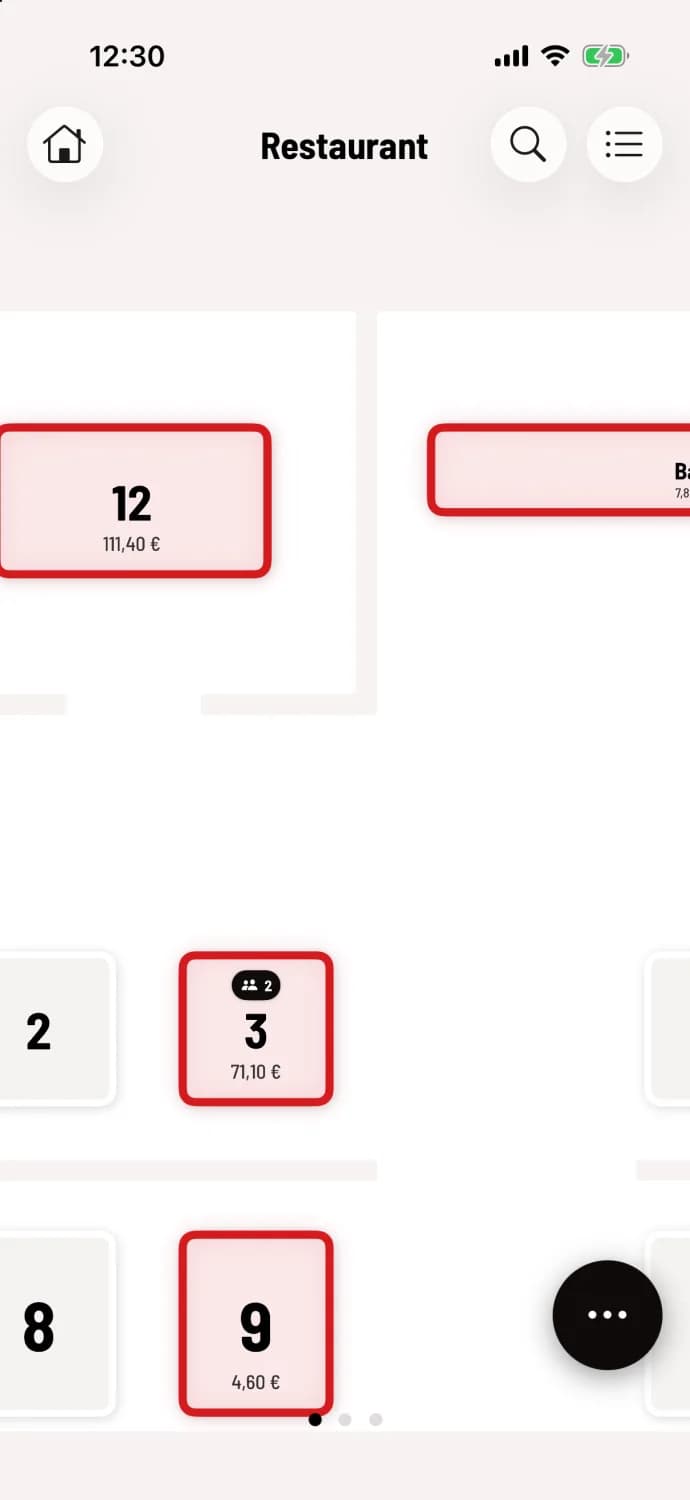
Frame
Thin, light frame – the table is clear.
Green – an order was recently placed here.
Yellow (orange) – nothing has happened for a while since the last order (standard: 15 minutes or more).
Red – the table is waiting too long (standard: 30 minutes or more).
How the colors are generated and how to set the minutes is explained under "Service Traffic Light." If the traffic light is switched off, occupied tables have an orange border. If a table in the Web desk has its own color, its surface is slightly tinted in that color.
Amount
The total amount owed by all parties at the table is displayed below the table name. It disappears after the bill has been settled.
Symbol at the top of the tile
If a table needs attention, a small pill sits on top. It always shows only the most important reason, in this order:
Bell (orange) – the kitchen has indicated that a course is ready but has not yet been served. A number next to it indicates several completed courses.
Clock with minutes – a course that has been called out has been in the kitchen for a long time.
Calendar with time – a reservation is due soon at this table today.
Two people with a number – several parties are seated at the table.
Calendar with a tick – a guest with a reservation is seated at this table.
The bell and clock only appear for multi-course orders and when the kitchen signals "ready" via the kitchen monitor. The clock is linked to the service indicator light: if the light is off, the clock disappears, but the bell remains. The calendar icons only appear with the reservation module active; see Reservations in the table plan.
Restaurants in the statistics beta also see speed indicators such as Pick up or Visit table, see speed indicators in the table plan.
On your smartphone, you only see the symbol and amount after zooming in – a double tap is all it takes.