
Manage subscriptions and invoices
Check tariff and contract duration, maintain billing data and download subscription invoices.
Under Settings → Subscription, you'll find each restaurant you've added, along with its rate, duration, and billing address. Your invoices are located below this. Only the restaurant owner manages a restaurant's subscription; everyone else will see Only the owner can manage the subscription.
Tariffs and Prices: Free is free. Solo (€39), Pro (€59) and Max (€99) cost per restaurant per month plus VAT, billed via Stripe and cancel monthly: Tariffs and trial period.
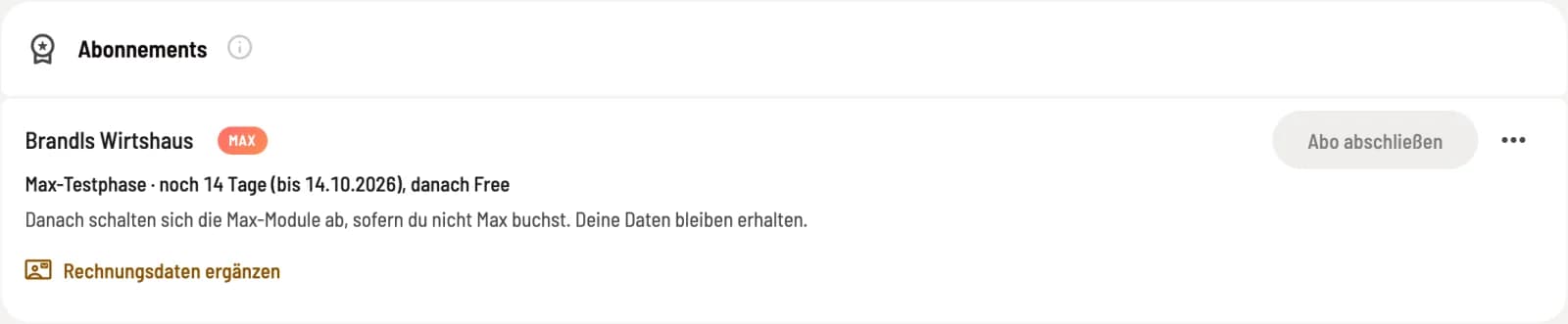
The row of a restaurant
Step 1 of 2
Tariff and contract term
The pill icon next to the name indicates the currently valid tariff. Below it states Next renewal on…, and after cancellation, Ends on…. A trial period appears as Maximum trial period · … days remaining (until…), then free, and activation by Servire is also explicitly stated. A stored partner code is displayed as a pill icon next to it.
Step 2 of 2
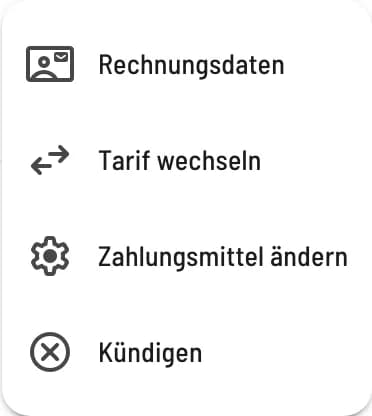
Further actions
Via … you can access billing information and, as long as no subscription is active, the partner code. If you have an active subscription, you can also change your plan, change your payment method, and cancel. Change your payment method opens the Stripe customer portal.
Invoice data
The billing details only apply to Servire 's subscription invoices to this restaurant, not to your guests' receipts. The restaurant's master data is suggested; please check it, as it contains the restaurant's name, not necessarily the invoice recipient. Leaving invoice email blank means invoices will be sent to the account holder's email address. Changes will take effect with the next invoice; the dialog will then display Appears on today's invoice and Applies with the next invoice. You can correct issued invoices via Correct invoice.
Download invoices

Subscription invoice as PDF
Under Invoices, select the Year. The table displays Invoice Number, Subscription, Amount, Payment Status, and Created on. The download icon downloads the invoice as a PDF. A new invoice is generated after each payment; corrected invoices are marked Cancellation.
Forwarding to the partner
If you have consented to Servire sharing your name and email address with the partner whose code you used to access this site, the section Sharing with the partner will appear below. Clicking Revoke consent will stop the sharing.