
Menu Generator (PDF)
Create a print-ready PDF from your menus in one of six designs.
The menu generator creates printable PDFs from your menus, without the need for a layout program. It always uses the most up-to-date information; after every price change, you can generate a new menu in just one minute.
Open generator
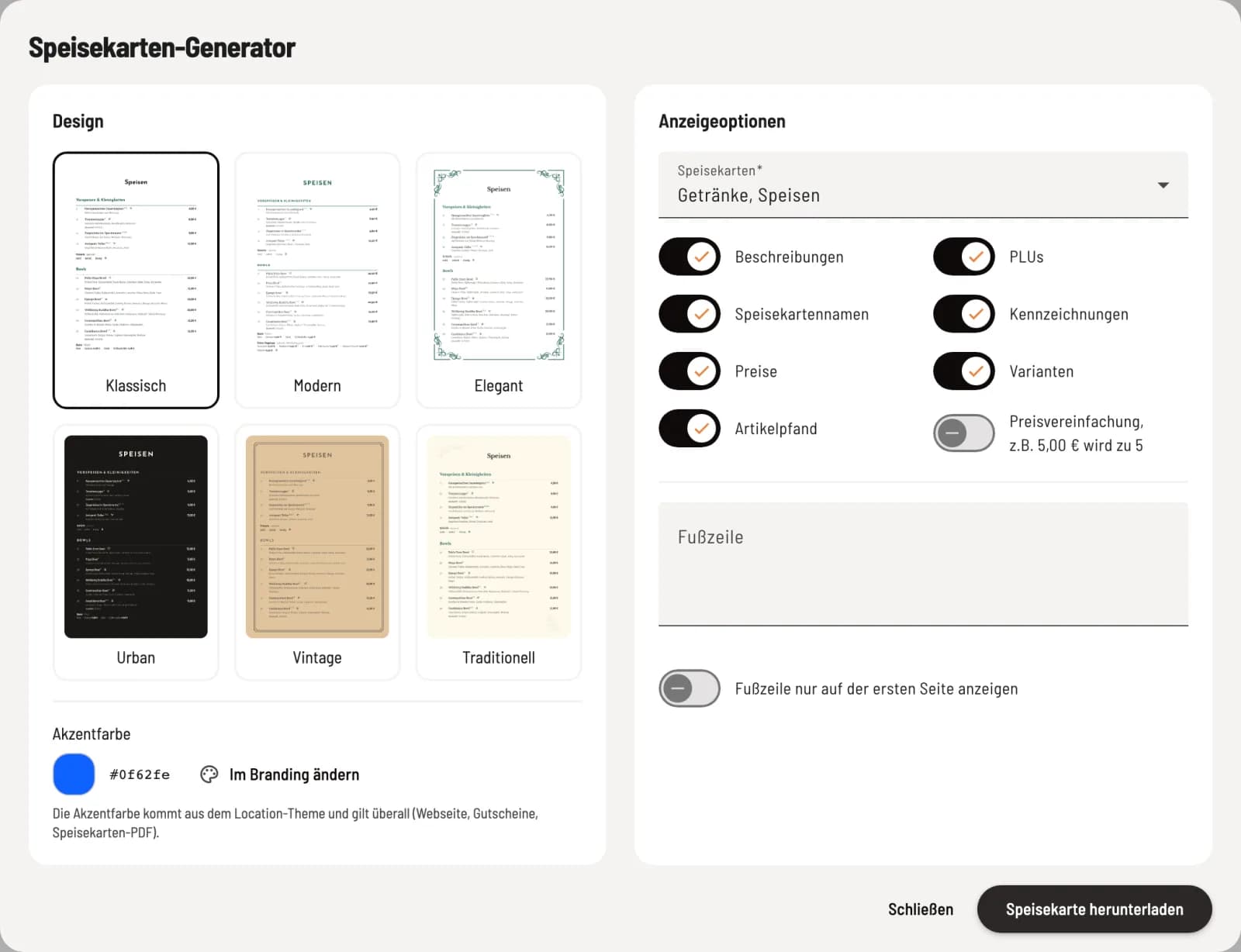
Click on ⋯ → Menu Generator in the menu header. On the left, select the Design, and on the right, the Display Options. **Download menu ** generates the PDF.
Design and color
The available options are Classic, Modern, Elegant, Urban, Vintage, and Traditional. The accent color comes from your restaurant's branding and also applies to your website and vouchers. You can change it via Change in Branding, see Setting up your restaurant's branding.
Display options
Menu: which menus should be included in the PDF.
Turn descriptions, menu names, prices, item deposit, PLUs, labels and variants on or off.
Price simplification: €5.00 becomes €5.00. There is no rounding; €4.80 remains €4.80.
Footer: Text for each page, such as an allergen legend or opening hours (up to 500 characters). Show footer only on the first page displays it once.
What's included in the PDF: All active item for which the Website & PDF channel is enabled are included in the PDF. Sold-out item are also printed, as paper is not always available. Time-sensitive menus are also included. See Where an item appears.