
Set up payroll export
This is how you prepare the transfer of hours to DATEV or another payroll program.
The payroll export function transfers the hours worked for each employee, broken down by wage type, to your payroll department at the end of the month. The payroll software calculates wages, taxes, and social security contributions. You only need to configure it once: target system, payroll client, wage types, and the transfer method for each employee. If anything is missing, the pre-check will identify the gap.
Prerequisite: Time tracking is included in the Max plan. It can be activated and managed by the owner and anyone with the rights to **Use Web desk ** and Manage Time Tracking & Payroll. Your payroll department will provide information on the target system and wage types.
Target system and payroll client
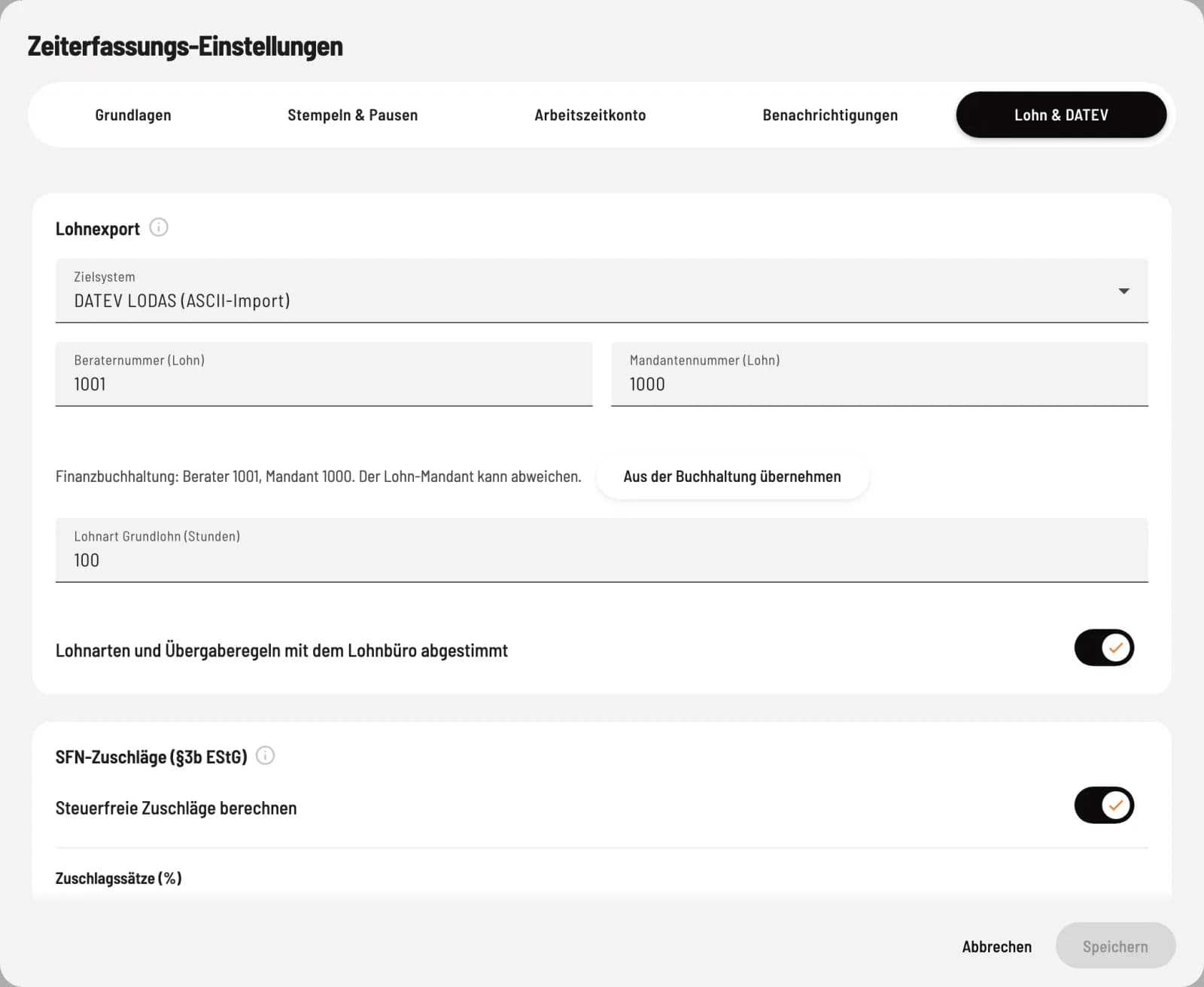
Reiter Payroll & DATEV
Under Employees, open the Time Recording Settings via the gear icon and then the Payroll & DATEV tab.
Target system: ** DATEV LODAS (ASCII import), ** DATEV Payroll (transaction data), or Payroll preparation journal (CSV, other programs). No payroll export disables it.
Advisor number (payroll) (4 to 7 digits) and Client number (payroll) (1 to 5 digits), only available with DATEV. These may differ from the financial accounting system; Import from accounting system suggests the numbers from DATEV accounting.
Basic wage type (hours): the hourly wage type from your payroll program. There is no default value.
Wage types and transfer rules agreed upon with the payroll department releases the export. By doing so, you confirm that your payroll department understands the rules: hours per wage type, assignment to the month of commencement of employment, and that a new delivery completely replaces the old one. Any changes to the target system, client, or wage types will invalidate this confirmation.
Wage types for surcharges
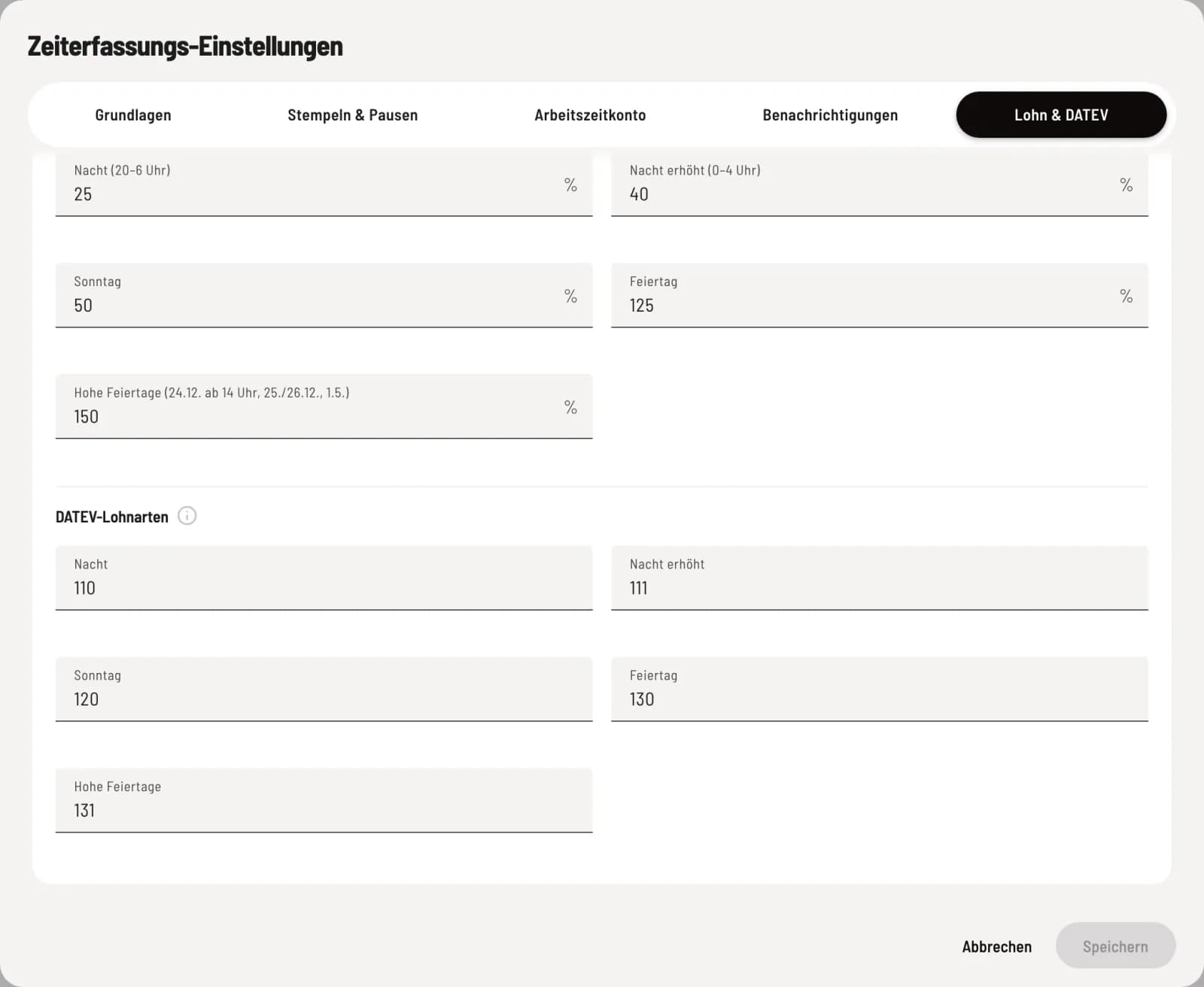
DATEV- Wage types
If Calculate tax-free surcharges is enabled, each surcharge type under ** DATEV wage types** requires its own number: Night, Night Increased, Sunday, Public Holiday, and High Holidays. Without a wage type, a surcharge type remains blocked as soon as surcharge hours are incurred.
Wage types for vacation and sick leave
If you use the duty roster, approved vacation and sick leave are included as hours in the payroll export. To do this, enter the Vacation and Sick Leave wage types from your payroll program under the Payroll & DATEV tab in the Wage Types for Absences section. How absences are created is explained in Entering Absences and Managing the Vacation Account.
For each day of absence, one-seventh of the weekly target hours are deducted; for half a day, half is deducted. If no weekly target hours are deducted, no hours are deducted; the preliminary check indicates this.
In DATEV LODAS and DATEV Payroll, the pre-check blocks the export if one of the two wage types is missing and such days occur in the month. Without Max, the wage types can no longer be maintained. The pre-check then only issues a warning, and the lines are missing from the file.
Absences only apply to the handover type hourly wage: hours and surcharges.
Paid other items are not transferred during export; the pre-check reminds you to enter them in the payroll program. Time off in lieu is never exported.
Like any change to the wage types, this one also cancels the confirmation Wage types and transfer rules agreed with the payroll office.
Handover method per employee
In the Edit Employee dialog, under Payroll & Accounting, select Transfer to Payroll Program and the Employee Number, see Entering Hourly Rate, Employee Number and Time Account. Without a transfer type, the export will lock the employee.
In Bavaria, you specify in the Working Time Account tab whether Assumption Day (August 15th) is a public holiday at your workplace and whether your workplace is Augsburg. Without this information, payroll export for August will be blocked.
Have your payroll department import the first file as a test run before the first actual payroll month. This way, incorrect wage types will be detected early.