
Complete the cash register report in ELSTER.
What information you enter into Mein ELSTER for your Servire cash register.
With the Solo tariff, you register your cash register yourself with the tax office using a form in Mein ELSTER. This form tells you what to enter in each field. You can find four of the required values beforehand in the Web desk .
Prerequisite: An ELSTER user account and a configured TSE (from Solo onwards). You must register within one month of purchase, as well as after decommissioning. From Pro onwards, Servire submits the notification for you: Register cash register with the tax office.
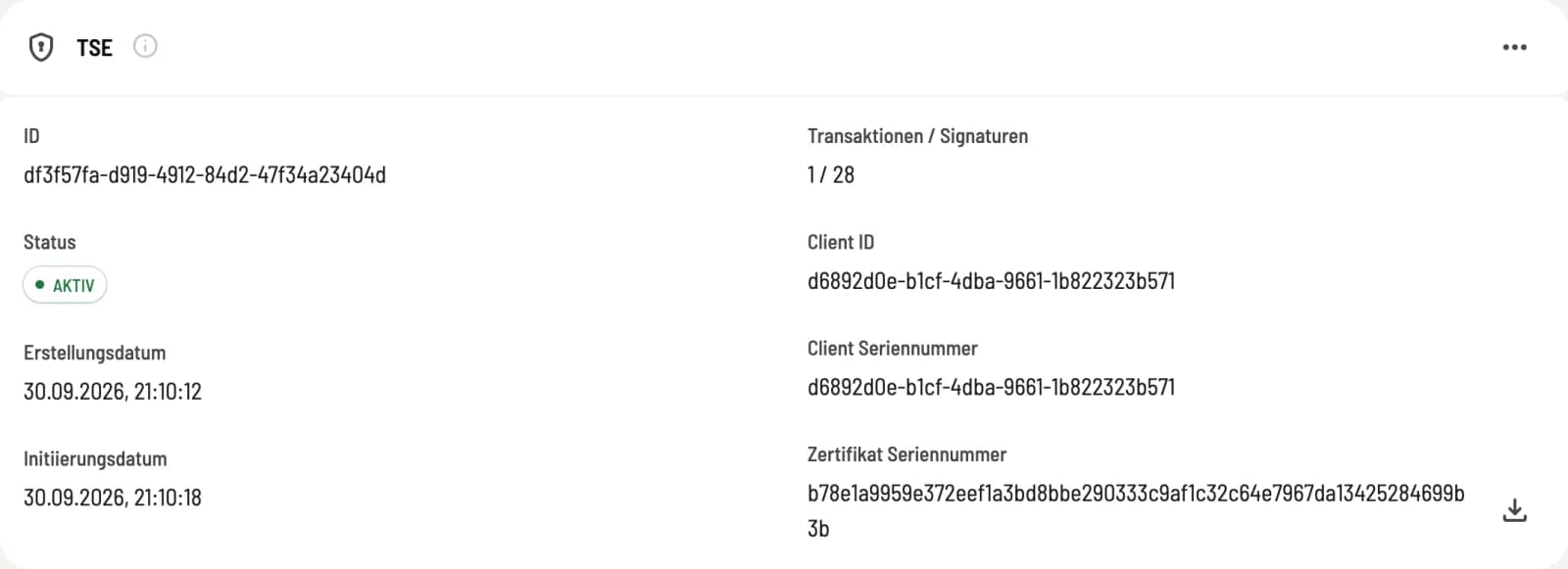
Read the TSE identifiers
In the Web desk, open Settings → TSE. The "TSE" tab displays Creation Date, Initiation Date, Client Serial Number, and Certificate Serial Number. You will need these four values in ELSTER.
Open form in ELSTER
Log in to Mein ELSTER and open Forms & Services → All Forms → Other Forms → Notification of Electronic Recording Systems (§ 146a Paragraph 4 AO). First, enter your company's tax identification number and the taxpayer's details, i.e., name or company name and address.
business premises
Business location name: the name of your establishment, as stated in your business registration or on your sign
Number of electronic recording systems used: 1. Servire counts as one system, regardless of how many devices you use for payment.
Address: the address of the establishment
Decommissioning of business premises: remains empty as long as you operate the premises.
Information on the recording system
Type of eAs: Tablet/App POS Systems
eAs Software: Servire
Software version of the eAs: can be left blank; updates do not need to be reported.
eAs serial number / software app: the client serial number from the TSE card
Manufacturer of the eAs: Servire GmbH
Model of the eAs: Servire
Acquisition of the eA: the creation date of the TSE, i.e., the day from which Servire with TSE are available to you.
Activation of the eAs: the first day you processed payments in this establishment using Servire and TSE.
Decommissioning and Reason for Decommissioning: remain empty as long as you use the Servire.
Information on the TSE
** TSE Serial Number:** The certificate serial number from the TSE card, 64 characters. Write the letters in uppercase; ELSTER expects A to F.
BSI Certification ID: 0717-2025
Installation of the TSE: the creation date, optional
Commissioning / Activation of the TSE: the Initiation date
Expiry date of the TSE: can be left blank.
Type / Design of the TSE: Cloud
Manufacturer of the TSE: fiskaly GmbH
Change or unsubscribe later
Each location receives one notification, and it always includes all cash registers for that location, even if there's a correction. If you receive a new TSE ( Technical Security Equipment), you send the notification again with the updated values. If you stop using Servire , you enter Decommissioning of the eAs and the Reason: Deregister cash register.
If you are switching from another POS system to Servire, the old POS system must be included in the same notification, along with the date and reason for its decommissioning. You then enter Servire as the new system.
You are responsible for the accuracy of the report. If in doubt, consult your tax advisor.