
Guest card at the checkout
Everything about a regular customer at a glance: stamps, credit, caps and newsletter.
The guest information sheet shows you at the checkout what you need to know about a guest and summarizes the actions related to them: topping up credit, settling the balance, inviting them to the newsletter.
Prerequisite: Max plan and guest management enabled in Web desk: Guest Management Settings. Settle the balance requires the permission Can process orders, Pay out credit requires the permission **Can cancel item **; without this permission, the entry is missing.
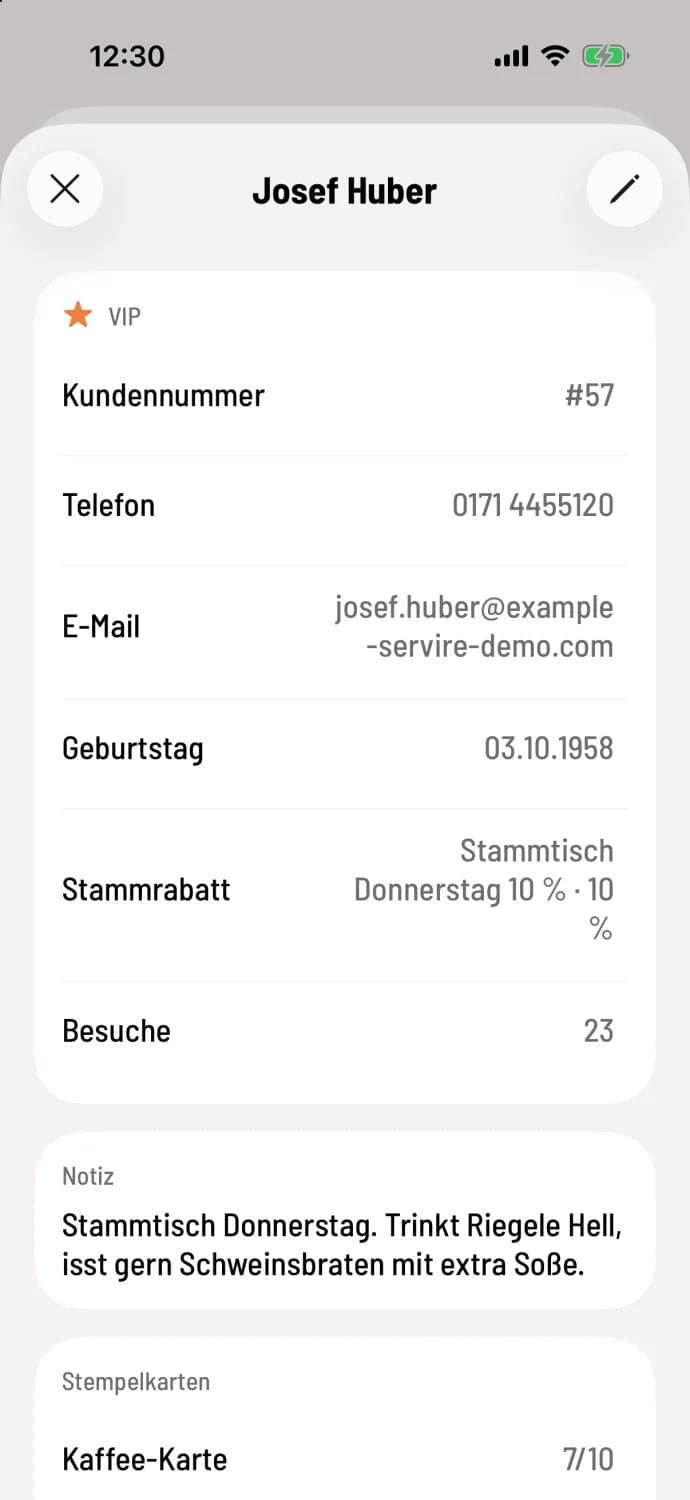
Open guest sheet
On the Payment screen, tap the ⓘ next to the assigned guest, or at the table, tap the guest's name in the party list. The sheet will have the guest's name as the title, for example, Josef Huber; at the top, you'll find their VIP status, customer number, phone number, email address, birthday, loyalty discount, and number of visits.
What you see
Customer number, contact details, birthday and note. If it's the guest's birthday today, it will be at the top.
Loyalty discount and Visits.
Allergies with the date of consent.
Stamp cards with status and, if one is full, reward available with the date until which it can be redeemed.
What you can do
Top up balance: The guest deposits money which they later redeem when settling their bill. The same sales page opens as with gift vouchers: Sell and redeem gift vouchers.
Payout of balance: Pays out remaining balance in cash as a courtesy of the company: Check voucher and pay out remaining value.
Settle the tab: pay the guest's open tabs: write on the tab and pay later.
Invite to newsletter: The guest receives an email and confirms their subscription. Only send invitations if they have agreed. No second invitation will be sent within 30 days.
Pen: Edit guest, for example, note or VIP.
Credit, caps, and newsletters require an internet connection. Without a connection, the paper displays Currently unavailable — no connection.